


When you type an incorrect URL or search for a non-existent product, you will land on a page known as the 404 page. Sometimes this page is a hard 404 or a soft 404 page. These two pages are different as they send their own HTTP status code when the user requests it.
This article will provide you with a comprehensive guide about the 404 page, its types, importance, inspirational examples to look at, and how to create 404 page of your own.
A 404 Page or a 404 Not Found page is an HTTP status code that a web server sends to the user when they try to access content or open a URL that is either deleted, moved, or simply does not exist. In simpler words, if you try to open or access the web content or the link URL that doesn’t exist or has been deleted, then the website will show you the 404 error page.
For instance, if you open or access this URL on our website https://wpvoid.com/kchayr , then you will encounter a 404 web page, as this page does not exist in the WPVOID database. Or, if you try to open the old URL that was already deleted or moved, then the server will show http status 404 Not Found page.
To better understand the 404 not found, imagine this: You are doing online shopping on Amazon. You liked the product, you saved the URL, but you plan to buy it after a few weeks. Unfortunately, Amazon deletes the product, the reason might be any, such as being out of stock, the supplier stopping selling, or no more manufacturing of that product.
Now, if you open that link, you will see a 404 not found site, as it does not exist anymore, and sadly, you might end up being frustrated. However, a well-designed and interesting 404 page can mitigate this frustration by guiding the user back to valuable content.
It’s obvious that a 404 not found error is fundamentally an issue, but if the website owner handles it carefully, it can ultimately reduce bounce rate and gain more traffic, while maintaining the brand's existence.
Here is the list of the importance of custom not found 404 page and how it can positively affect the SEO and lead to opportunities:
The default 404 page often has a jarring and boring design, which might lead to frustration and inconvenience to the user. The 404 page should not contain a dead end. Having a user-friendly and clear navigational option helps the user to have a better user experience and preserve their trust.
Web visitors can easily bounce back to the serp back when they encounter a boring and no way 404 page. Instead of having a simple page that comes as a default page, the web designer should incorporate some design, such as links to the homepage, search bars, popular posts, or main categories.
This practice will encourage visitors to explore other pages that the user might be interested in, which helps in gaining potential Traffic and reducing the Bounce Rate.
The 404 error page can be a blessing in disguise, as it helps to capture a lead if implemented properly. Business owners or developers add an interesting call-to-action(CTA) or a link to a subscription box for a newsletter, or just a link to a contact form. These practices can effectively turn the lost visitor into a potential lead.
While a genuine 404 error page does not affect your SEO performance, it will reduce user frustration if implemented with interesting and easy user navigation. Past that, the improperly configured, also known as soft 404, can be damaging. So while creating the 404 page, developers need to ensure the server sends a 404 response signal, not the 200 OK status code.
A Soft 404 error is a 404 not found error where the server sends the HTTP 200 OK status code, instead of a 404 error code. In simpler terms, when the 404 error page throws a 200 status code, it means that everything is OK on the server side, which is known as a soft 404 error page.
404 error pages are usually of two types. The first one is a Hard 404 page or a Normal 404 page, and the other is a soft 404 error page.
The business owners or the developer do not create the soft 404 page; however, the tools or CMS sometimes automatically create the soft 404 page. The soft 404 page is harmful for SEO as it can trick Google or its crawler.
For instance, if you create a 404 error page and you index that page, then it will be a soft 404 page. Whenever the visitor tries to access the non-existent content, they will be redirected to the 404 page that states there is no such URL or content.
However, the server sends a 200 OK response, as you have indexed it. So, to avoid a soft 404 error page, you should not index the custom 404 error page.
You can check using various methods, such as Inspection URL on search console, or Inspecting elements on the browser, to identify whether your page is a Normal ( Hard ) 404 or a Soft 404 page.
The primary goal of this method is to check whether Google indexes it or not. Here is the explanation of the method and its process:
To see whether your 404 page is Soft or Hard on Search Console, follow these steps:
Step 1: Open your Google Search Console account
Step 2: Click on the URL Inspection, or simply paste the 404 page URL in the inspect URL field at the top of Console.
Step 3: Check whether the 404 page is indexed or not. The Soft 404 page means the page that is indexed by Google or a browser, and they send a 200 OK status.
Step 4: If your 404 page is indexed, then you can consider it a soft 404 page. The Normal 404 page should not be indexed, and it sends a 404 status code.
You can use the browser's inspect element to check the types of 404 pages. Here are simple steps to follow:
Step 1: Open the 404 pages in the Google browser
Step 2: Right-click and click on Inspect
Step 3: Click on the “ Network ”
Step 4: Press the “Reload Page” button
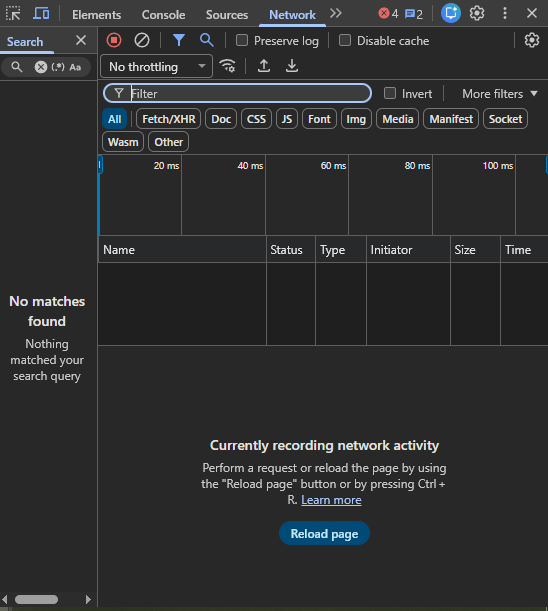
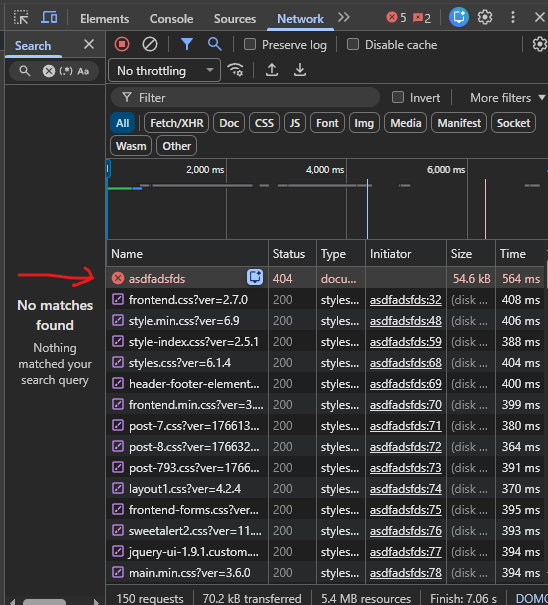
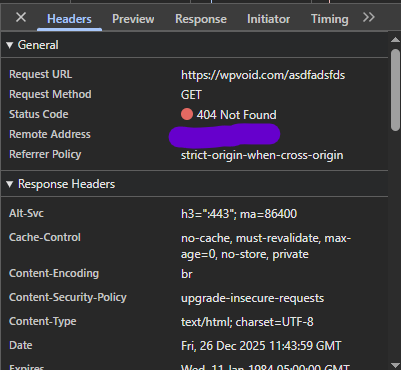
Step 5: Check the code status. If you found http 404 response code, then it's a Normal (Hard) 404 page, which is good for SEO.
Here is a list of the 5 best 404 pages examples to look at as an inspiration, and how they make interesting and engaging 404 pages not found on their site.
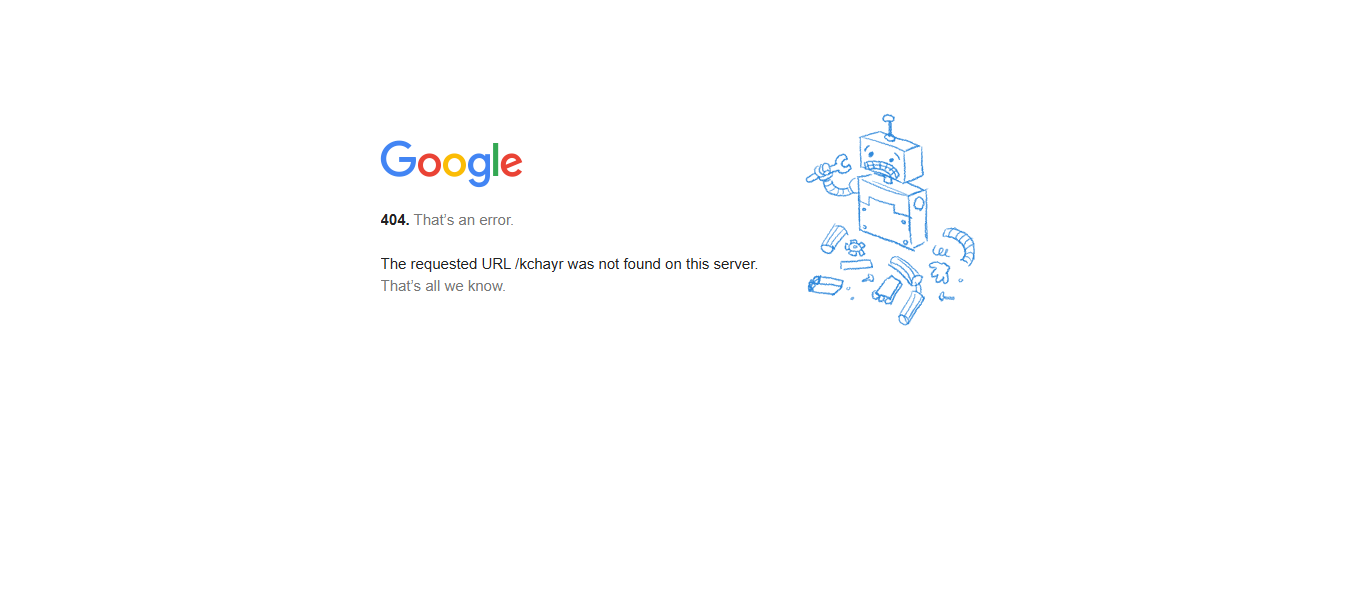
If you see Google’s 404 error page, it is simple, and the design is so clean and minimalistic. They clearly state that the page is 404 not found, and it's an error.
Moreover, they also mention that the typed / written URL is incorrect, with a broken machine picture.
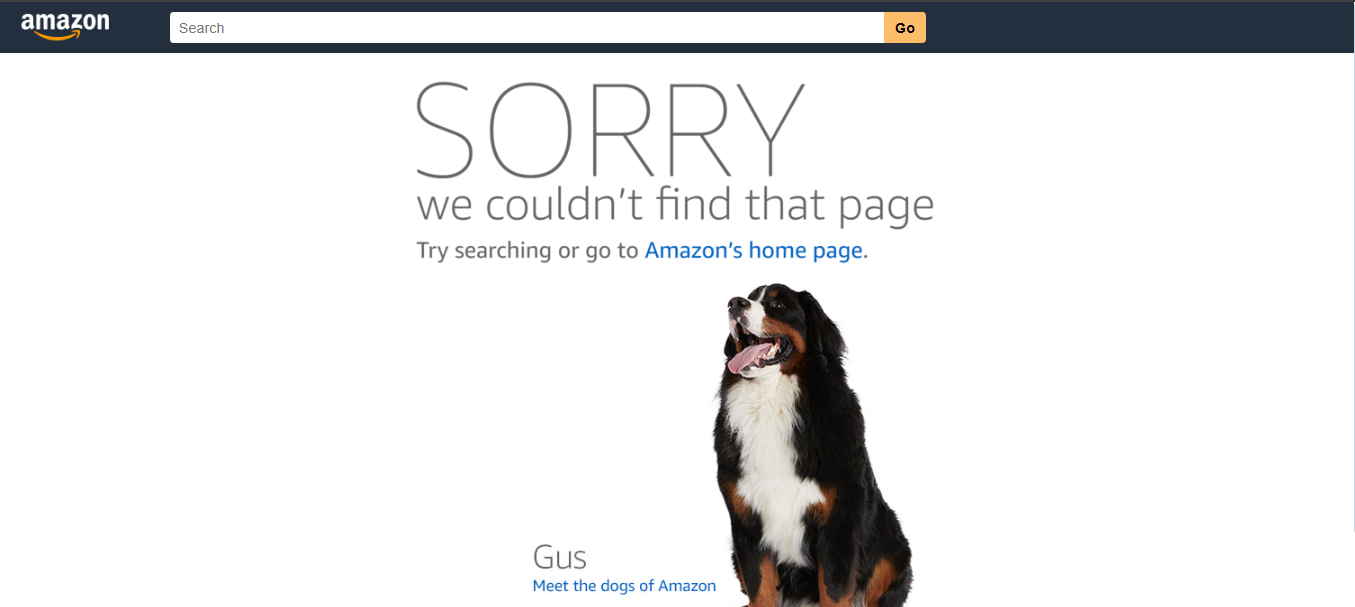
Amazon's 404 error page has a simple design, yet functional. They have added the search bar to find the desired product and the text to return Amazon homepage.
Did you notice something interesting here?? Yes!! The dog one. They have added the link to the dog picture. This is something so random, yet more interesting.
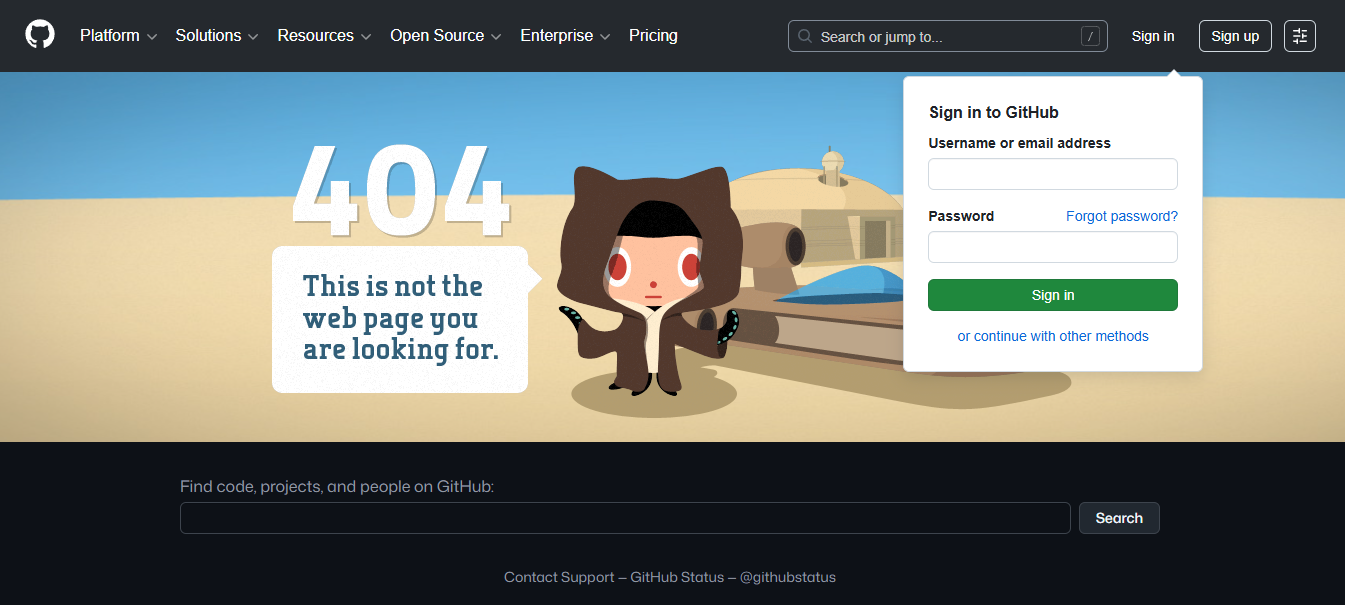
GitHub has a creative and stylized image with the animated 404 image. The user can log in, navigate the mega menu, sign up, or search the project repository through the 404 page. They have included almost everything from the heading, footer, to the subscribe button.
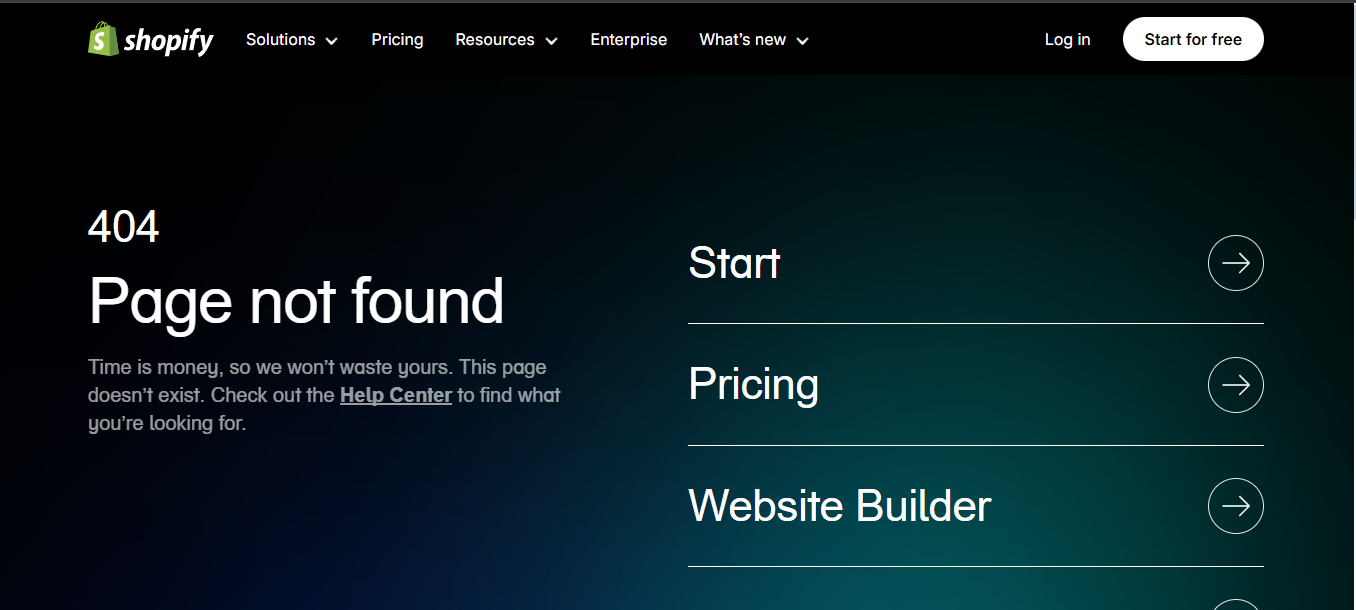
Shopify's 404 page has a design focused on capturing a lead or saving the user time, as they can easily navigate to the help center. They have included almost every important page of their site on the 404 error page, including pricing, login, getting started, and all others.
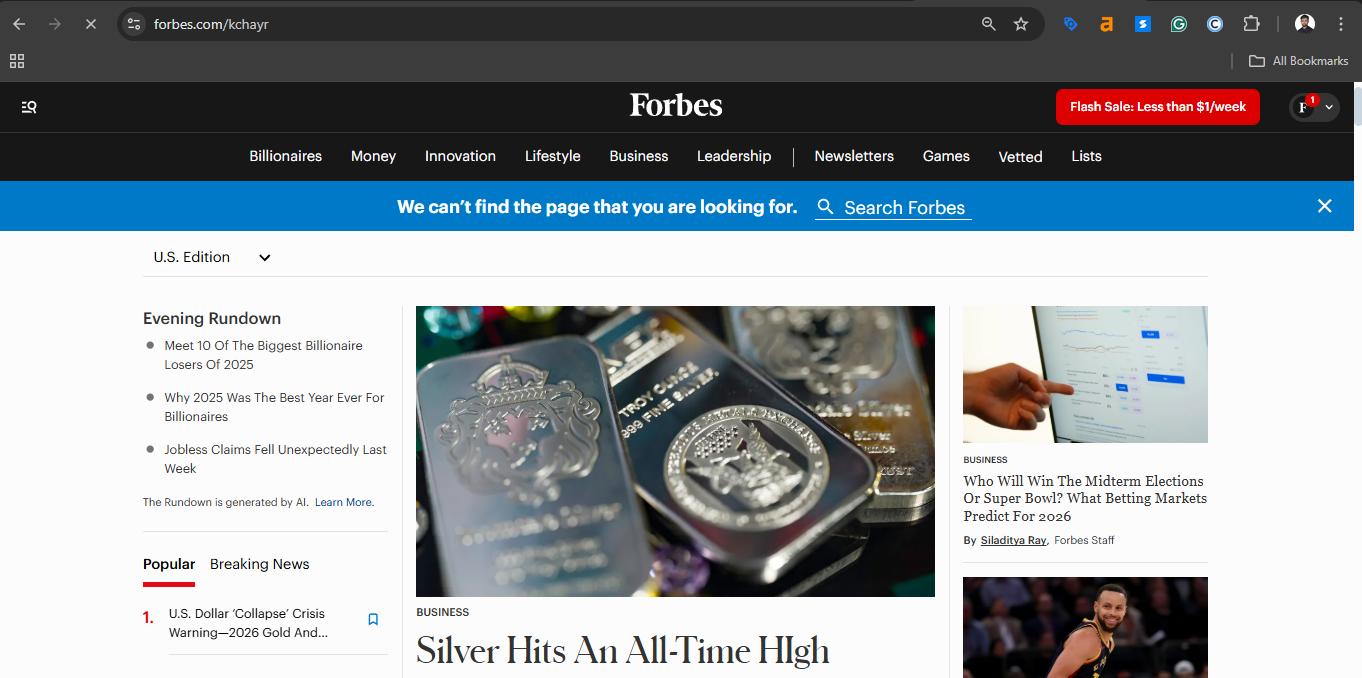
Forbes' 404 error page has many blogs, such as trending, popular, and newest articles. Their 404 page looks almost page rather than a 404 page.
However, it's a hard 404 page, which means it sends a 404 status code when you request the page. Moreover, the primary purpose of the Forbes 404 error page is to generate traffic, as it is a news website.
WordPress allows you to edit, customize, or create a custom 404 page for your site. Here is the step-by-step guide to edit 404 page in WordPress using a plugin:
Step 1: Log in to the WordPress dashboard
Step 2: Create your custom 404 error page if you don’t have one. You can use Elementor or any WordPress editor to create.
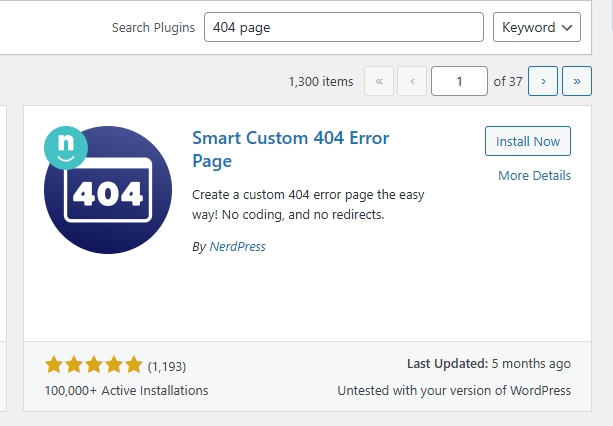
Step 3: Navigate to the Plugins Section and Search for “ 404 page ”
Step 4: Install the Smart Custom 404 Error page plugin
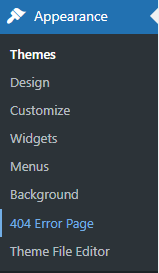
Step 5: Go to Appearance and Click on “ 404 Error Page ”
Step 6: Now choose your custom 404 page and Save Changes. Here the page name is custom 404 error page.
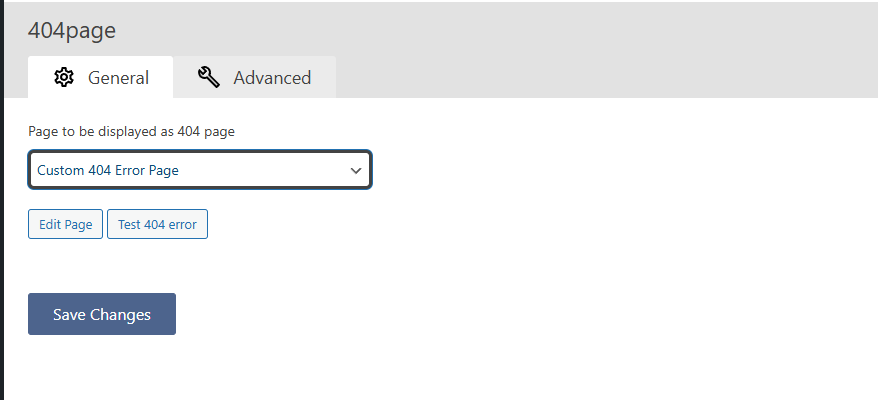
Note: Do not index your 404 page. Indexing this page will return a 200 OK status code when calling, and it is considered a Soft 404 error page, which is bad for SEO.
You can create a custom 404 error page on WordPress by editing or creating the 404.php file. This is the manual process where you need to change the website content/code by accessing the file manager.
Here is the step-by-step process to add a custom 404 not found page without plugins on your WordPress site.
Step 1: Log in to your Admin Dashboard
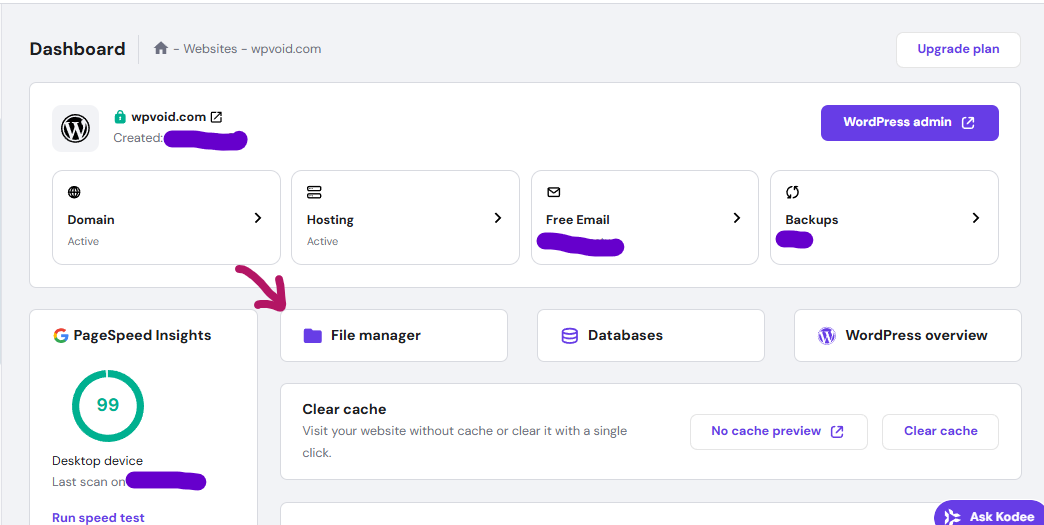
Step 2: Make sure you have a backup of the site or 404 page
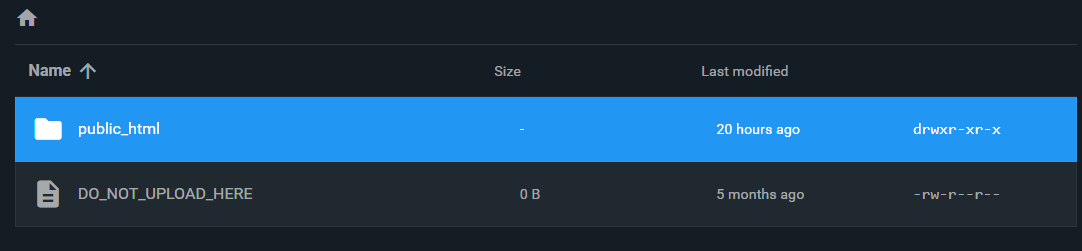
Step 3: Click on the File Manager and open the public_html folder
Step 4: Navigate to wp-content

Step 5: Open the themes folder

Step 6: Choose your theme name
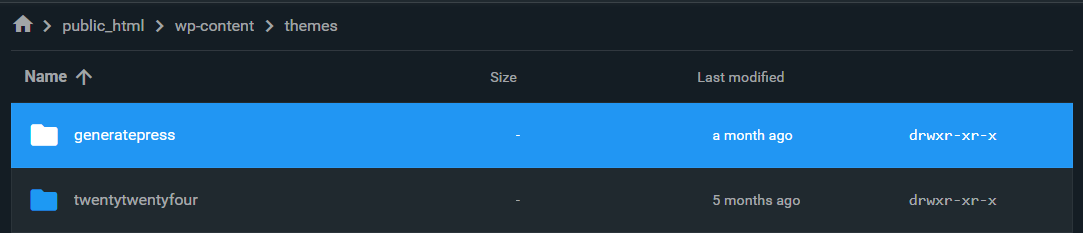
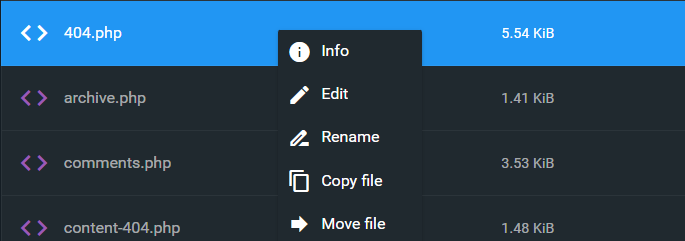
Step 7: Now, create or edit the 404.php file
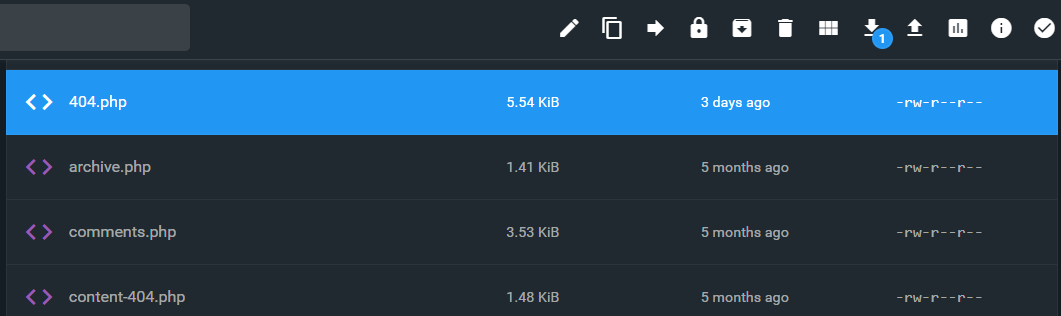
Step 8: Make sure to back up the 404.php file before editing it.
Step 9: Now, add your HTML/CSS code between the get_header () and get_footer () PHP functions.
The full and comprehensive design is definitely based on the website's nature and motive. Some sites are meant to generate traffic, capture leads, and serve other purposes.
Here are 3 free basic code samples of effective 404 pages to look for ideas and inspiration. To use for your site you might need extra design and customization.
<!DOCTYPE html>
<html lang="en">
<head>
    <meta charset="UTF-8">
    <meta name="viewport" content="width=device-width, initial-scale=1.0">
    <title>404 Not Found | wpvoid</title>
    <style>
        /* New Color Palette: */
        /* Main Accent: #8c52ff */
        /* Background: #fef6ff */
        /* Text Color: #1e1926 */

        /* --- Base 404 Styling --- */
        .wpvoid-modern-404 {
            display: flex;
            flex-direction: column;
            align-items: center;
            text-align: center;
            padding: 20px;
            min-height: 80vh;
            justify-content: center;
            background-color: #fef6ff; /* Updated Background Color */
            font-family: Arial, sans-serif;
            color: #1e1926; /* Updated Text Color */
        }

        .wpvoid-modern-404 .error-content-area {
            max-width: 600px;
            margin-top: 20px;
        }

        .wpvoid-modern-404 h1 {
            font-size: 3em;
            color: #1e1926; /* Updated Text Color */
            margin-bottom: 10px;
            border-bottom: 3px solid #8c52ff; /* Updated Accent Color */
            display: inline-block;
            padding-bottom: 5px;
        }

        .wpvoid-modern-404 .subtitle {
            font-size: 1.2em;
            color: #1e1926; /* Updated Text Color */
            margin-bottom: 25px;
        }

        .wpvoid-modern-404 .error-image {
            max-width: 90%;
            height: auto;
            margin-bottom: 30px;
        }

        /* --- Search Form Styling --- */
        .wpvoid-modern-404 .search-form-wrapper {
            margin-bottom: 30px;
            width: 100%;
        }

        .wpvoid-modern-404 .search-form {
            display: flex;
            border: 2px solid #ddd;
            border-radius: 8px;
            overflow: hidden;
            box-shadow: 0 2px 4px rgba(0, 0, 0, 0.05);
        }

        .wpvoid-modern-404 .search-field {
            flex-grow: 1;
            padding: 12px 15px;
            border: none;
            font-size: 1em;
            outline: none;
            color: #1e1926; /* Ensure input text is readable */
            background-color: #fff;
        }

        .wpvoid-modern-404 .search-submit {
            background-color: #8c52ff; /* Updated Accent Color */
            color: white;
            padding: 12px 20px;
            border: none;
            cursor: pointer;
            font-weight: bold;
            transition: background-color 0.3s;
        }

        .wpvoid-modern-404 .search-submit:hover {
            background-color: #7a46e0; /* Slightly darker purple for hover */
        }

        /* --- Button Styling --- */
        .wpvoid-modern-404 .navigation-links {
            display: flex;
            flex-direction: column;
            justify-content: center;
            gap: 15px;
            width: 100%;
        }

        .wpvoid-modern-404 .btn-primary,
        .wpvoid-modern-404 .btn-secondary {
            padding: 12px 20px;
            border-radius: 5px;
            text-decoration: none;
            font-weight: bold;
            transition: all 0.3s;
            display: block;
        }

        .wpvoid-modern-404 .btn-primary {
            background-color: #8c52ff; /* Updated Accent Color */
            color: white;
        }

        .wpvoid-modern-404 .btn-primary:hover {
            background-color: #7a46e0;
        }

        .wpvoid-modern-404 .btn-secondary {
            background-color: transparent;
            border: 2px solid #1e1926; /* Updated Border Color (Text Color) */
            color: #1e1926; /* Updated Text Color */
        }

        .wpvoid-modern-404 .btn-secondary:hover {
            background-color: #1e1926;
            color: white;
        }

        /* --- Tablet and Desktop Responsiveness (Min-width 768px) --- */
        @media (min-width: 768px) {
            .wpvoid-modern-404 {
                flex-direction: row;
                text-align: left;
            }

            .wpvoid-modern-404 .error-image-area {
                flex: 1;
                padding-right: 40px;
            }

            .wpvoid-modern-404 .error-content-area {
                flex: 1;
                max-width: none;
                margin-top: 0;
            }

            .wpvoid-modern-404 .error-image {
                max-width: 100%;
            }

            .wpvoid-modern-404 h1 {
                font-size: 4em;
            }

            .wpvoid-modern-404 .navigation-links {
                flex-direction: row;
                justify-content: flex-start;
            }
            .wpvoid-modern-404 .btn-primary,
            .wpvoid-modern-404 .btn-secondary {
                display: inline-block;
                width: auto;
            }
        }
    </style>
</head>
<body>
    <div class="wpvoid-404-container wpvoid-modern-404">
        <div class="error-image-area">
            <img src="https://wpvoid.com/wp-content/uploads/2025/12/Wpvoid_404_sample_image.png" alt="Wpvoid 404 Page Not Found" class="error-image">
        </div>
        <div class="error-content-area">
            <h1>404 Error - Page Lost</h1>
            <p class="subtitle">It seems the page you were looking for doesn't exist on **wpvoid**.</p>
            <div class="search-form-wrapper">
                <form role="search" method="get" class="search-form" action="/">
                    <label>
                        <span class="screen-reader-text">Search for:</span>
                        <input type="search" class="search-field" placeholder="Try searching wpvoid..." value="" name="s" />
                    </label>
                    <input type="submit" class="search-submit" value="Search" />
                </form>
            </div>

            <div class="navigation-links">
                <a href="/" class="btn-primary">Go to **wpvoid** Homepage</a>
                <a href="/blog/" class="btn-secondary">Check out Latest Guides</a>
            </div>
        </div>
    </div>
</body>
</html><!DOCTYPE html>
<html lang="en">
<head>
<meta charset="UTF-8" />
<meta name="viewport" content="width=device-width, initial-scale=1.0" />
<title>Page Not Found | wpvoid</title>
<style>
/* New Color Palette: */
/* Main Accent: #8c52ff */
/* Background: #fef6ff */
/* Text Color: #1e1926 */
/* --- Base 404 Styling --- */
.wpvoid-minimal-404 {
display: flex;
flex-direction: column;
align-items: center;
text-align: center;
padding: 30px 20px;
min-height: 75vh;
justify-content: center;
background-color: #fef6ff; /* Updated Background Color */
font-family: "Helvetica Neue", sans-serif;
color: #1e1926; /* Updated Text Color */
}
.wpvoid-minimal-404 .error-header {
margin-bottom: 20px;
}
.wpvoid-minimal-404 .error-code-large {
font-size: 8em;
font-weight: 900;
color: #d8c2ff; /* Lighter shade of accent for subtle code */
line-height: 1;
display: block;
}
.wpvoid-minimal-404 h2 {
font-size: 1.8em;
color: #8c52ff; /* Updated Accent Color */
margin-top: -10px;
}
.wpvoid-minimal-404 .error-content {
max-width: 650px;
}
.wpvoid-minimal-404 p {
color: #1e1926; /* Ensure paragraph text uses the primary text color */
}
.wpvoid-minimal-404 .error-image {
max-width: 250px;
height: auto;
margin: 20px auto;
display: block;
}
/* --- CTA Styling --- */
.wpvoid-minimal-404 .cta-section {
margin: 30px 0;
}
.wpvoid-minimal-404 .cta-button {
background-color: #8c52ff; /* Updated Accent Color */
color: white;
padding: 15px 30px;
font-size: 1.1em;
font-weight: bold;
text-decoration: none;
border-radius: 50px;
transition: background-color 0.3s, transform 0.2s;
box-shadow: 0 4px 6px rgba(140, 82, 255, 0.3); /* Subtle shadow matching the accent */
display: inline-block;
}
.wpvoid-minimal-404 .cta-button:hover {
background-color: #7a46e0;
transform: translateY(-2px);
}
.wpvoid-minimal-404 .secondary-actions a {
color: #1e1926; /* Updated Text Color */
text-decoration: none;
font-size: 0.9em;
transition: color 0.3s;
}
.wpvoid-minimal-404 .secondary-actions a:hover {
color: #8c52ff; /* Updated Accent Color */
text-decoration: underline;
}
/* --- Responsiveness --- */
@media (max-width: 480px) {
.wpvoid-minimal-404 .error-code-large {
font-size: 6em;
}
.wpvoid-minimal-404 h2 {
font-size: 1.5em;
}
.wpvoid-minimal-404 .cta-button {
padding: 12px 25px;
}
}
</style>
</head>
<body>
<div class="wpvoid-404-container wpvoid-minimal-404">
<div class="error-header">
<span class="error-code-large">404</span>
<h2>Oops! This Page is Missing from **wpvoid**</h2>
</div>
<div class="error-content">
<p>
We searched everywhere, but couldn't find the file you requested. It
might have been deleted or moved.
</p>
<p>But don't go! We have plenty of other great content for you.</p>
<img
src="https://wpvoid.com/wp-content/uploads/2025/12/Wpvoid_404_sample_image.png"
alt="Wpvoid Page Not Found"
class="error-image"
/>
<div class="cta-section">
<a href="/" class="cta-button">Return to **wpvoid** Homepage</a>
</div>
<div class="secondary-actions">
<a href="/contact/">Report the Error</a> |
<a href="/categories/">Browse Topics</a>
</div>
</div>
</div>
</body>
</html>
<!DOCTYPE html>
<html lang="en">
  <head>
    <meta charset="UTF-8" />
    <meta name="viewport" content="width=device-width, initial-scale=1.0" />
    <title>Error 404 | wpvoid</title>
    <style>
      /* New Color Palette: */
      /* Main Accent: #8c52ff */
      /* Background: #fef6ff */
      /* Text Color: #1e1926 */

      /* --- Base 404 Styling --- */
      .wpvoid-structured-404 {
        padding: 40px 20px;
        min-height: 70vh;
        display: flex;
        align-items: center;
        justify-content: center;
        background-color: #fef6ff; /* Updated Background Color */
        font-family: Roboto, sans-serif;
        color: #1e1926; /* Updated Text Color */
      }

      .wpvoid-structured-404 .content-wrapper {
        display: flex;
        flex-wrap: wrap;
        gap: 40px;
        max-width: 1200px;
        background: white;
        padding: 40px;
        border-radius: 10px;
        box-shadow: 0 4px 12px rgba(0, 0, 0, 0.05);
      }

      .wpvoid-structured-404 .text-column {
        flex: 2;
        min-width: 300px;
      }

      .wpvoid-structured-404 .cta-column {
        flex: 1;
        min-width: 250px;
      }

      .wpvoid-structured-404 h3 {
        color: #8c52ff; /* Updated Accent Color */
        font-size: 1.2em;
        margin-bottom: 5px;
      }

      .wpvoid-structured-404 h1 {
        font-size: 2.5em;
        margin-top: 0;
        margin-bottom: 20px;
        color: #1e1926;
      }

      .wpvoid-structured-404 p {
        color: #1e1926;
      }

      .wpvoid-structured-404 .quick-links {
        list-style: none;
        padding: 0;
        margin-top: 25px;
      }

      .wpvoid-structured-404 .quick-links li {
        margin-bottom: 10px;
      }

      .wpvoid-structured-404 .quick-links a {
        color: #8c52ff; /* Use accent for link color */
        text-decoration: none;
        font-weight: 500;
      }

      .wpvoid-structured-404 .quick-links a:hover {
        text-decoration: underline;
      }

      /* --- CTA Box Styling (Lead Capture) --- */
      .wpvoid-structured-404 .cta-box-subscribe {
        background-color: #fff; /* White background for the inner box */
        padding: 30px;
        border-radius: 8px;
        border: 1px solid #d8c2ff; /* Light border */
        border-left: 5px solid #8c52ff; /* Updated Accent Color border */
        box-shadow: 0 2px 5px rgba(0, 0, 0, 0.05);
      }

      .wpvoid-structured-404 .cta-box-subscribe h4 {
        margin-top: 0;
        color: #8c52ff; /* Updated Accent Color */
        font-size: 1.1em;
      }

      .wpvoid-structured-404 .subscribe-form {
        display: flex;
        flex-direction: column;
        gap: 10px;
        margin-top: 15px;
      }

      .wpvoid-structured-404 .subscribe-form input[type="email"] {
        padding: 10px;
        border: 1px solid #ddd;
        border-radius: 5px;
        color: #1e1926;
      }

      .wpvoid-structured-404 .subscribe-form button {
        background-color: #8c52ff; /* Updated Accent Color */
        color: white;
        padding: 10px;
        border: none;
        border-radius: 5px;
        cursor: pointer;
        font-weight: bold;
        transition: background-color 0.3s;
      }

      .wpvoid-structured-404 .subscribe-form button:hover {
        background-color: #7a46e0;
      }

      /* --- Image Handling --- */
      .wpvoid-structured-404 .error-image-mobile {
        display: none;
      }

      /* --- Tablet and Mobile Responsiveness --- */
      @media (max-width: 768px) {
        .wpvoid-structured-404 .content-wrapper {
          flex-direction: column;
          padding: 25px;
        }

        .wpvoid-structured-404 .cta-column {
          order: -1;
        }

        .wpvoid-structured-404 .error-image-mobile {
          display: block;
          max-width: 150px;
          height: auto;
          margin: 20px auto;
        }
      }
    </style>
  </head>
  <body>
    <div class="wpvoid-404-container wpvoid-structured-404">
      <div class="content-wrapper">
        <div class="text-column">
          <h3>Something Went Wrong (Error 404)</h3>
          <h1>Uh Oh! This Link is Broken on **wpvoid**</h1>
          <p>
            We apologize! The page you tried to access is not available. Please
            use the options below to find what you need.
          </p>

          <ul class="quick-links">
            <li><a href="/">➤ Go back to the Homepage</a></li>
            <li><a href="/contact/">➤ Contact **wpvoid** Support</a></li>
            <li><a href="/about/">➤ Learn More About Us</a></li>
          </ul>

          <img
            src="https://wpvoid.com/wp-content/uploads/2025/12/Wpvoid_404_sample_image.png"
            alt="Wpvoid Error"
            class="error-image-mobile"
          />
        </div>

        <div class="cta-column">
          <div class="cta-box-subscribe">
            <h4>Don't miss out on future content!</h4>
            <p>
              Subscribe to the **wpvoid** newsletter and get our latest guides
              delivered weekly.
            </p>
            <form class="subscribe-form" action="#" method="POST">
              <input
                type="email"
                placeholder="Enter your email address"
                required
              />
              <button type="submit">Subscribe Now</button>
            </form>
          </div>
        </div>
      </div>
    </div>
  </body>
</html>
Should I use a 301 Redirect or a 404 error when I delete an old page?
You should almost always use a 301 Redirect if the deleted page has a relevant substitute or if you want to preserve the page's SEO value (link equity) by pointing it to a new, related page.
Are there different "types" of 404 errors beyond the standard "Not Found"?
Yes, servers can return more specific 404 codes, though they are less common. Examples include 404.1 (Site Not Found), 404.14 (Request URL too long), or 410 Gone.
Is it better to include a search bar on a custom 404 page?
A search bar is generally better for immediate user utility, as it allows the visitor to directly input what they are trying to find.